Sites
A site is a place where your team does work for a customer: a tower, a branch, a depot. Open Sites in the sidebar to see them all, on a list and a map.
What a site holds
- Name: what your team calls it. Names are different for every site.
- Customer: whose site it is.
- Location: the address, and the point on the map.
- Site code: the customer's own number for the site, such as a Vodacom site ID. A customer can't have two sites with the same code. The code shows after the site's name, for example Midrand Tower (VC1234), so you can find a site on a job by typing its code.
- Access notes: what someone needs to get in: gate codes, where the keys are, who to ask on arrival.
Import sites from a spreadsheet
- Open Sites and choose Import sites.
- Choose the customer the sites belong to, or leave it on From the file's Customer column when your file has one.
- Choose your file: Excel (.xlsx) or CSV, up to 2,000 sites.
- Check the preview. Each row says New, Update or Can't import, and why a row can't be imported.
- Choose Import.
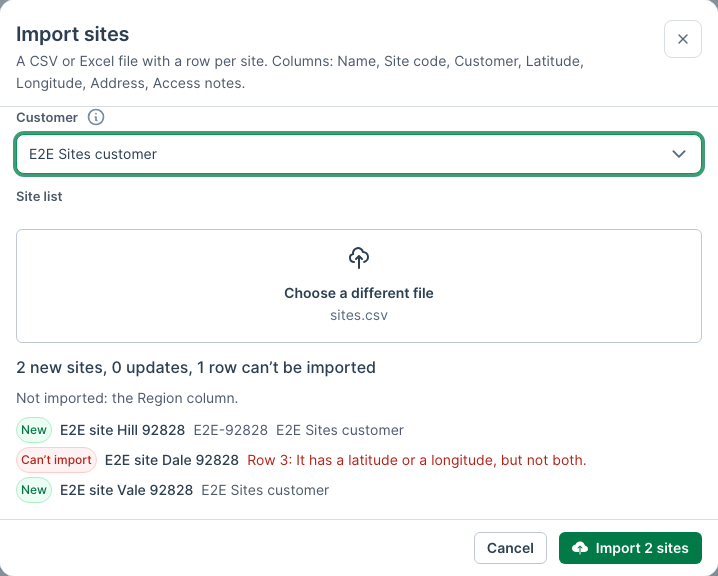
Nothing is saved until you choose Import.
The file needs a row of headings, then one row per site. These headings are understood:
| Heading | Also understood as |
|---|---|
| Name | Site name, Site |
| Site code | Code, Site ID, Site number |
| Customer | Client |
| Latitude | Lat |
| Longitude | Long, Lng, Lon |
| Address | Physical address, Location |
| Access notes | Notes, Access |
Other columns are left out, and the preview names them.
A row updates an existing site when the customer already has a site with the same site code, or the same name when the row has no code. Empty cells never clear what a site already has.
A row can't be imported when:
- it has no name;
- its latitude or longitude is missing, isn't a number or is out of range;
- its code or name appears twice in the file;
- another site already has its name;
- there's no customer, or more than one customer with that name.
Directions from a job
On a job with a site, the job's details show the site's Access notes and a Directions link. On a phone, it opens your maps app with the route from where you are.