Send a form to a customer
When you want answers from one person, send them the form. Their answers come back to the record you sent it from.
Send it
- Open the customer, lead, beneficiary, appointment or sales order, and choose Send a form. On a job, it is under Perform actions.
- Pick the form.
- Choose Email or SMS, or Copy link to send it yourself.
- Choose Send (or Get link, if you chose Copy link).
A form sent from an appointment, an order or a job goes to that record's customer.
A lead's or a beneficiary's link opens whatever they've saved so far, so you can send them a form, or a reminder, only if you can see the form's responses (see Who can see responses). If you can't, you're asked to get an admin to send it, and nothing is sent or listed.
If the form can't be sent, for example because there is no email address on file, you're told why. The failed send is also listed under Engage → Sent messages.
Send it to your team
To ask your own staff, each with their own link, see Send a form to your team.
See who hasn't answered
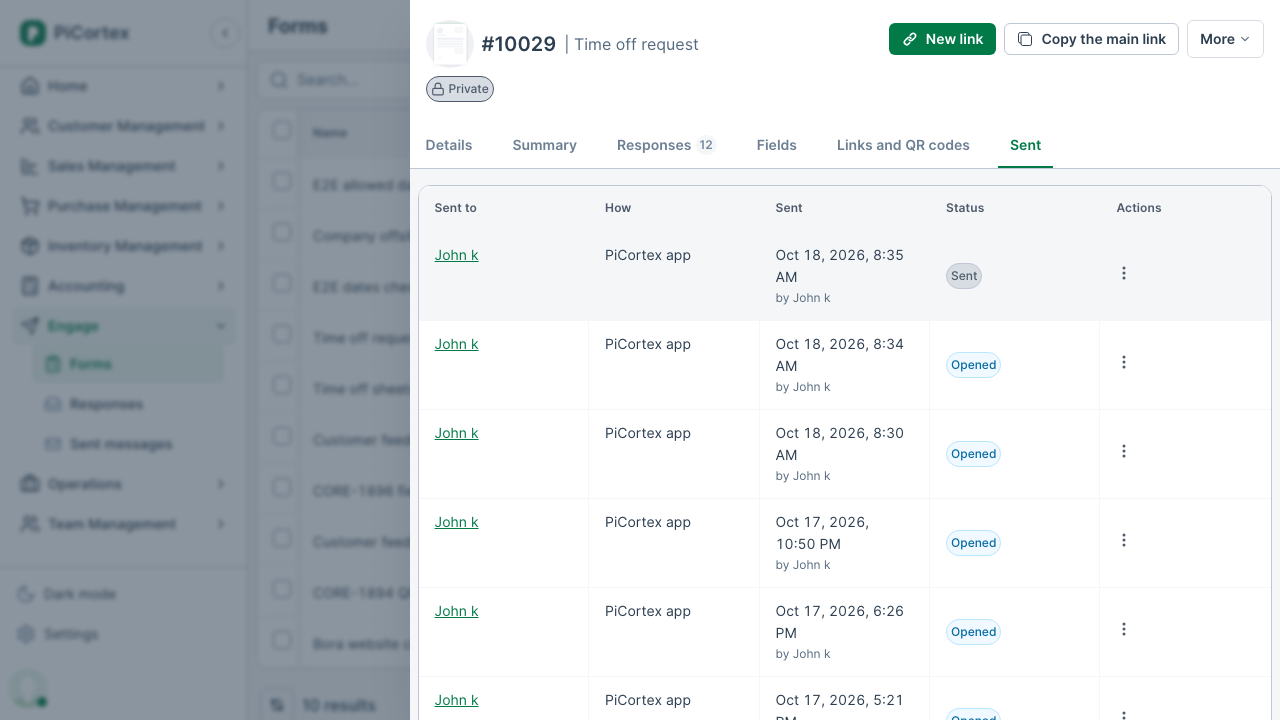
A form you've sent shows as Sent, waiting at the top of the record's Form responses tab until it is answered. The form's own Sent tab lists everyone it was sent to.
| Status | What it means |
|---|---|
| Sent | It went out, and the person hasn't opened it yet. |
| Opened | They opened the form but haven't submitted it. |
| Answered | Their response is in. It is on the record's Form responses tab. |
| Switched off | You switched the link off before they answered. |
Each row's actions are under Actions: Send reminder sends the same link again, the same way. Switch off stops the link working, for example if you sent it to the wrong person. A colleague's name opens their team member record.
Keep a form's responses private
To choose who can read a form's responses, see Who can see responses.