Ask for dates and count working days
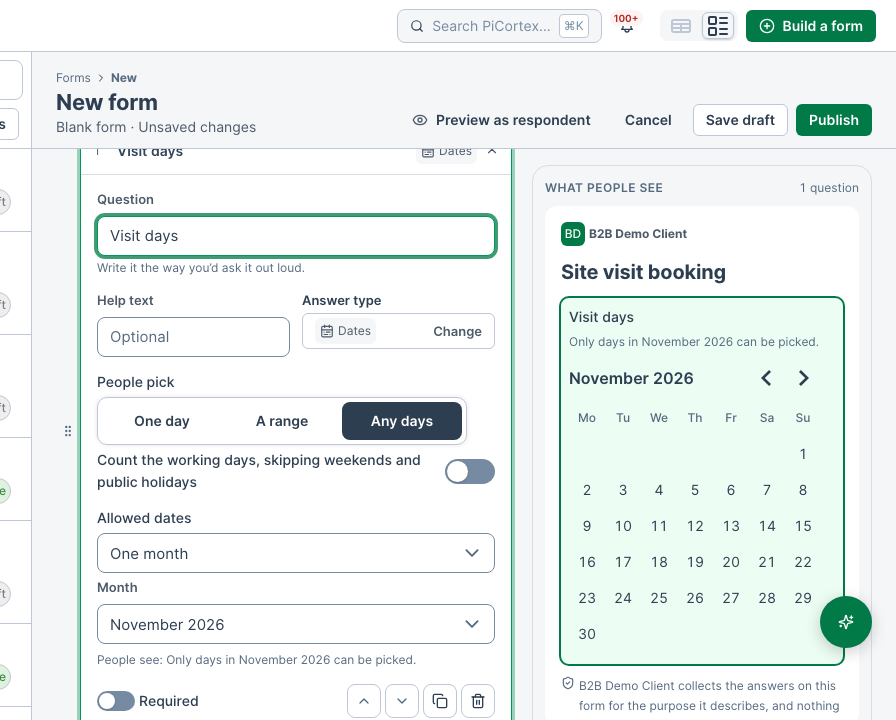
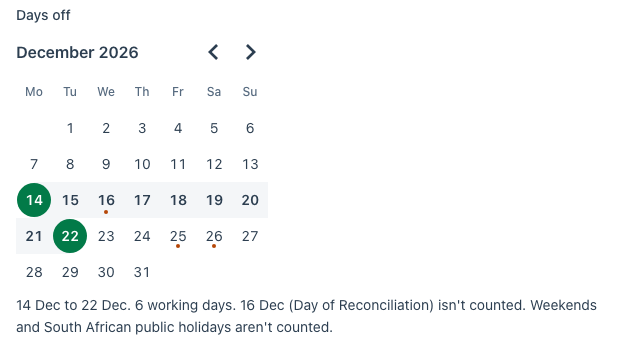
A Dates question lets the person pick days on a calendar. Add one in the form builder with Add a question, then Dates. They can pick one day, a range from the first day to the last, or any days. Choose which in the question's settings in the builder. Days are picked within a year of each other. Switch on Count the working days and the form counts the weekdays they picked, leaving out your country's public holidays and any holidays your business has added. It names what it left out, for example "2 working days. 16 Dec (Day of Reconciliation) isn't counted. Weekends and South African public holidays aren't counted." Public holidays come from an online calendar, so a holiday declared during the year is left out too. They are those of the country your business signed up with, and only South Africa's are supported for now: for a business in another country the form counts public holidays as working days, and says so. Holidays your business has added are left out wherever it is. PiCortex counts again when the form is sent, so the number on the response is always the right one, including for holidays more than a year away, which the form itself doesn't know yet.
Allowed dates
On a Dates question, or a Date question (one day, with no count), choose which days can be picked:
- Any date (the default).
- Today or later, counted by your business's date, not the phone's.
- Between two dates, both days included.
- One month, any day in the month you choose.
The form greys out the other days and says why, for example "From today, 17 Oct. Earlier days can't be picked." PiCortex refuses a response with a day outside them, whether it comes from a link, a QR code or your website. When someone comes back to a saved draft, a Dates day that has since closed is taken out and the form says so; a Date answer that has closed is marked, and the form won't send it until it's changed. "Today" moves on at your business's midnight, even on a tablet left open on the form. A form can't be published until a Between or One month setting is complete, and the builder warns when every day it allows has passed.